

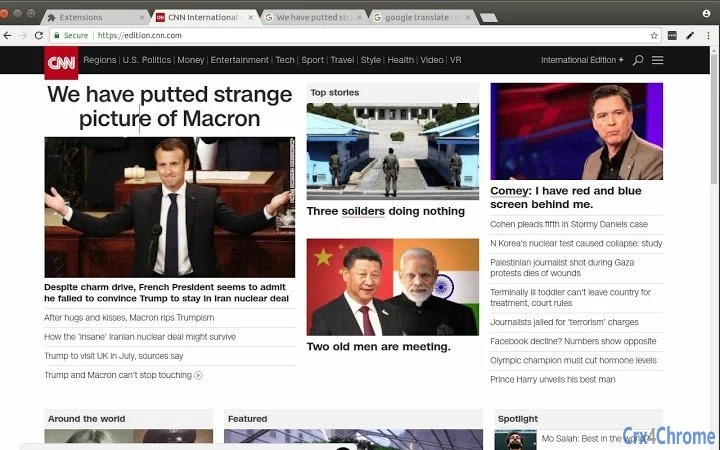
Description
Edit Web Pages Instantly with Open-Source Precision
Overview
The software is a browser extension designed to enable real-time editing of web pages directly within the browser. Its primary purpose is to simplify the process of modifying HTML, CSS, and content on any webpage, making it ideal for developers, designers, and content creators who need quick access to page elements. By providing a lightweight, secure, and open-source solution, it addresses the need for a transparent and trustworthy tool for web editing without relying on third-party services.
Target users include front-end developers, web interns, educators, and anyone interested in understanding or prototyping web layouts. The extension is particularly useful in educational settings, rapid prototyping, and debugging workflows. It supports immediate interaction with page structure, allowing users to test changes instantly and evaluate visual outcomes.
Developed by 1ce, a team focused on advancing open-source browser tools, the software aligns with a mission to promote transparency and community-driven development. The developer did not provide additional system requirements or detailed use case examples beyond the basic workflow.
Key Features & Capabilities
- Real-Time Page Editing – Allows immediate modification of HTML, CSS, and text content directly on any loaded webpage. Ideal for testing layout changes or visual adjustments without touching source files.
- Open-Source Transparency – The source code is publicly available for inspection, ensuring no hidden tracking or malicious behavior. Developers can audit, verify, and contribute to the project.
- Privacy-First Design – No data is recorded or transmitted. All edits remain local to the user’s device until explicitly shared.
- Minimal Permission Model – Requires only the "activeTab" permission to access the current webpage, limiting access to only what is necessary for editing.
- Easy Integration with Chrome – Simple installation via Chrome Web Store and instant activation with a single click on the extension icon.
Users can leverage this tool for rapid prototyping, classroom demonstrations, or debugging layout issues. For example, a developer can adjust a button’s color or position in real time to assess responsiveness before implementing changes in the codebase. The extension’s lightweight nature ensures it does not interfere with normal browsing.
User Interface, Workflow & Performance
The interface is minimal and integrated directly into the browser toolbar. After installation, users activate the extension by clicking its icon, which immediately enables editing mode on the current page. Navigation is straightforward, with no additional menus or settings required.
Workflow efficiency is high due to the direct one-click activation and immediate access to page elements. The user experience is optimized for speed and simplicity, focusing on core functionality without distractions. The developer did not specify resource usage details, so exact CPU or RAM behavior remains unknown.
Performance observations are based on general software behavior patterns. Given its small file size of 2.3 MB and limited permissions, it is expected to operate with low overhead. Stability is assumed to be consistent with typical Chrome extensions, though no specific reports on crashes or bugs were provided.
Compatibility & System Requirements
The software is compatible with Windows, Mac, and Linux operating systems. It is designed specifically for Chrome browsers, as indicated by the installation method and permission model.
Installation size is 2.3 MB, which is minimal and suitable for most modern systems. The developer did not specify exact system requirements, including processor, RAM, or disk space. Compatibility information was partially provided, with no details on older OS versions or alternative browsers.
Pros and Cons
Pros
- Open-source nature ensures transparency and trust
- Privacy-focused with no data collection
- Simple, one-click activation for immediate use
- Lightweight at just 2.3 MB
- Minimal permissions reduce security risks
Cons
- No support for browsers other than Chrome (implied)
- Limited to editing within the active tab
- No built-in save or export functionality for edits
- Exact performance impact not disclosed
- Requires technical understanding for full benefit
FAQ Section
Is this extension available for browsers other than Chrome?
The software is designed for Chrome, and no information was provided about compatibility with other browsers such as Firefox or Edge.
Does the extension collect or store my editing data?
No, the extension does not record or transmit any data. All edits are stored locally on your device until you choose to share them.
How often are updates released?
Update frequency was not specified. Users are advised to check the official website for the latest version.
Is the license type open-source?
Yes, the extension is open-source, meaning the code is publicly accessible and contributions are welcome.
Can I use this tool offline?
Yes, the extension functions entirely offline. No internet connection is required for editing web pages.
Final Thoughts
This browser extension offers a fast, secure, and transparent way to edit web pages directly in the browser. Its open-source foundation, minimal permissions, and privacy-first approach make it a trustworthy tool for developers and learners alike. While it lacks advanced features like saving edits or cross-browser support, its simplicity and focus on core functionality deliver a reliable experience for real-time web modifications.
It is best suited for developers, educators, and technical users who value transparency and control. For those seeking a lightweight, safe tool to prototype or debug web content, this extension delivers on its promise. The combination of security, openness, and ease of use sets it apart in the developer tools space.
Download Edit Web Pages Instantly with Open-Source Precision now
Guides & Tutorials for 1click Edit Page Extension for Chrome
How to install 1click Edit Page Extension for Chrome
- Click the Preview / Download button above.
- Once redirected, accept the terms and click Install.
- Wait for the 1click Edit Page Extension for Chrome download to finish on your device.
How to use 1click Edit Page Extension for Chrome
This software is primarily used for its core features described above. Open the app after installation to explore its capabilities.
User Reviews for 1click Edit Page Extension for Chrome 0
No reviews found





